


Blog
The best office chair for back pain (Australia, 2026)

Key Points
- Sitting loads your lumbar discs more than standing — and a slumped posture in a poor chair pushes that higher for hours at a time.
- Only a handful of features actually matter for back pain: lumbar support, seat depth, seat height, recline tension.
- There’s no single “best” chair for everyone — the right one is the one that fits your body and the way you work.
- Think of a good chair as an investment in your health, not just a cost — the right one pays for itself in comfort and focus over the years you’ll use it.
- Even the best chair won’t help if it’s set up wrong — two minutes of adjustment makes the difference.
- Pair the chair with a footrest, a screen at eye level and regular movement to finish the job.
- Leg numbness, weakness or bladder changes are red flags — see a professional rather than buying another chair.
If your back aches by mid-afternoon, the chair you’re sitting in is doing more damage than you think. Most of us spend more waking hours in an office chair than we do in bed — and the wrong one quietly loads your spine, hour after hour, until your lower back finally complains. The good news: the right chair takes that load off. This is a no-nonsense Australian buyer’s guide to the best office chair for back pain — what actually matters, what’s marketing fluff, how much you really need to spend, and how to match a chair to your body. If you want the underlying causes first, start with our guide to a sore lower back: causes and relief, then come back here to fix the biggest culprit — your seat.
Why Your Office Chair Makes or Breaks Your Back
Sitting isn’t restful for your spine — it’s work. The moment you sit, the discs in your lower back take on more pressure than when you stand, and a slumped seated posture pushes that higher again. Do it for eight hours a day, five days a week, and a mediocre chair becomes a slow, repetitive strain on the exact part of your back that’s already vulnerable.
A genuinely good ergonomic chair does three things: it supports the natural inward curve of your lower back (your lumbar lordosis), it lets you change posture easily through the day, and it spreads your weight so no single area takes the hit. That’s the whole game. Everything below is just how to spot a chair that actually delivers it — and ignore the ones that only look the part.
The 6 Features That Actually Matter
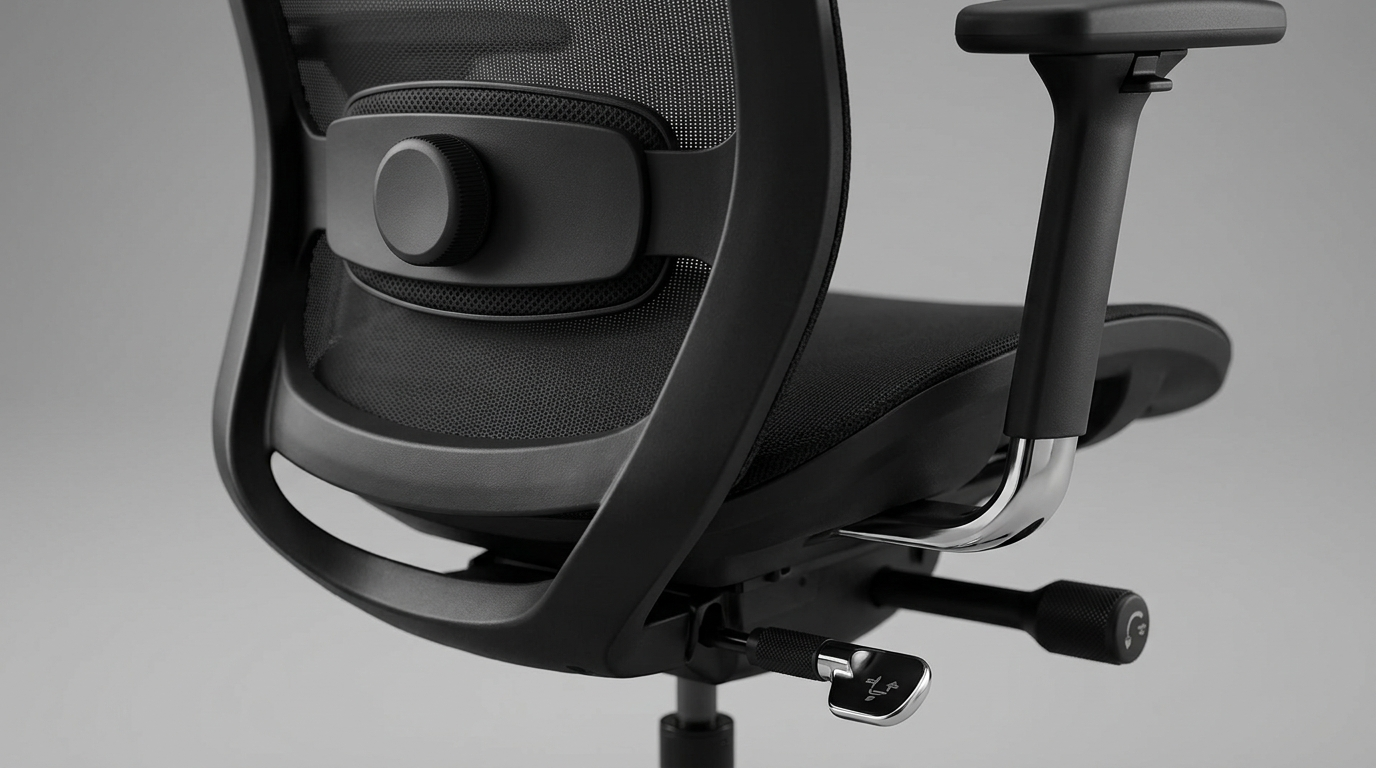
Showrooms love to dazzle you with mesh, chrome and “executive” badges. None of that supports your back. These six things do — treat them as your checklist:
| Feature | Why it matters for back pain |
|---|---|
| Adjustable lumbar support | Fills the gap behind your lower back so the spine keeps its natural curve instead of slumping into a C-shape. Height-adjustable is best — everyone’s lumbar sits at a different spot. |
| Seat depth (slide) | You want 2–3 finger-widths between the seat edge and the back of your knees. Too deep and you slide forward and slouch; a sliding seat pan lets you dial it in. |
| Seat-height range | Comfortable feet position, knees level with or below the hips. Depending on your stature this can be challenging. It may require the addition of a footrest in some circumstances. |
| Recline with tilt tension | With Syncron mechanism chairs, periodically leaning back can sometimes assist in offloading your discs. Tension control stops you from either fighting the backrest or flopping into it. |
| Seat material & edge | Breathable foam or quality mesh that doesn’t bottom out, with a waterfall front edge to keep pressure off the backs of your thighs. |
| Build quality & warranty | A chair you’ll sit in 2,000+ hours a year has to hold its adjustments. A long warranty is the maker telling you it will. |
“The best office chair for back pain isn’t the most expensive or the most impressive-looking — it’s the one adjusted to fit your body and the way you actually work.”
— Consistent with ergonomic guidance from Safe Work Australia on seated workstation setup.
Match the Chair to Your Body and How You Work
There’s no single “best office chair for back pain” for everyone — the best chair is the one that fits you. Here’s how to narrow it down quickly:
- Standard desk work, 8 hours a day: a well-specced ergonomic task chair is the sweet spot of support and value.
- You’re taller, heavier, or want a plusher feel: look at executive chairs with a wider seat and higher weight rating.
- Shift work or shared desks (call centres, control rooms): a 24/7 heavy-use chair is built to take constant sitting without sagging.
- Standing desk or a high bench: a drafting chair or sit-stand active seat keeps your support at the right height.
- You sit forward and slump (or hate sitting still): a kneeling chair or saddle stool opens your hip angle and encourages an upright pelvis.
Not sure which camp you’re in? Our team fits people to chairs every day — browse the full office chairs range or pop into a store and actually sit in a few. A 10-minute test sit tells you more than any spec sheet.
What Is Your Health Worth?
Choosing the right chair isn’t about how little you can spend — it’s about how much you value your long-term comfort and wellbeing. When you sit for hours each day, your chair becomes one of the most important investments you can make in your health.
Options vary — but the real question isn’t price, it’s the outcome:
- Entry-level options can provide a noticeable improvement in posture and daily comfort compared to basic or poorly designed chairs.
- Mid-range chairs offer better adjustability and support, helping reduce strain and manage ongoing back discomfort.
- Premium ergonomic chairs are designed to work with your body over the long term, using advanced support systems, higher-quality materials and extended warranties to deliver lasting performance.
A simple way to think about it: if you spend thousands of hours sitting each year, your chair directly impacts how you feel every single day — your energy, your focus and your physical health.
Rather than asking “What does it cost?”, a better question is: “What return am I getting on my health, comfort and productivity?”
When viewed this way, a well-designed ergonomic chair isn’t an expense — it’s one of the smartest investments you can make. Over its lifespan, the cost becomes minimal compared to the value of consistent support and the potential to avoid discomfort, fatigue or injury.
Set It Up Right (a 2-Minute Checklist)
The best chair in the world won’t help if it’s set up wrong. Once yours arrives, take two minutes:
Do This
- Set the seat high under the desk so your forearms are parallel with, or slightly above, the desk top
- Keep your legs level with, or slightly lower than, your hips
- If the chair is too tall, use a foot rest
- If the chair isn’t tall enough, raise the desk
- Ensure the seat depth leaves a small gap behind your knees
- Raise or lower the chair back / lumbar support to sit comfortably in the small of your back
Avoid This
- Perching on the front edge with no back contact
- A seat so high your feet dangle (or so low your knees rise)
- If you use armrests, letting them hunch your shoulders
- Sitting dead still for hours — even the best chair needs you to shift
For a full workstation tune-up — monitor height, keyboard position and the rest — follow our 10 steps to optimising your workstation.
Beyond the Chair: the 20% That Finishes the Job
A great chair fixes most of the problem. These finish it:
- Get your feet sorted. If your feet don’t sit flat, a foot rest restores the hip-knee angle that takes pressure off your lower back.
- Lift your screen. Eyes level with the top of the monitor stops the forward head-lean that drags your whole spine out of line. Our ergonomic accessories cover monitor arms and risers.
- Move more often. The best posture is your next one. Stand, stretch or walk every 30–45 minutes — here’s why sit-stand desks can help lower back pain.
- Build the support underneath. A chair supports your spine; your core stabilises it. See how core strength changes posture and pain, and a few quick posture fixes for the office.
When to See a Professional
A better chair and setup resolve most “my back hurts at my desk” stories. But see your GP or a physiotherapist promptly if you have pain that wakes you at night, pain spreading down a leg with numbness, pins-and-needles or weakness, any loss of bladder or bowel control, or pain following a fall or injury. Those are signals to get assessed rather than to keep adjusting a chair. For a deeper look at warning signs and recovery, read our guide on lower back pain causes and relief.
Frequently Asked Questions
What is the best office chair for back pain?
The best office chair for back pain has adjustable (ideally height-adjustable) lumbar support, an adjustable seat depth and height, and a recline with tilt tension — set up to fit your body. A well-specced ergonomic task chair suits most people; taller or heavier users may want an executive or 24/7 chair. Fit matters more than brand, so test-sit where you can.
Are ergonomic office chairs actually worth it for back pain?
Yes. For anyone sitting several hours a day, a chair that supports the natural curve of your lower back and lets you change posture genuinely reduces the load that causes desk-related back pain. The key word is “ergonomic” in substance, not just on the label — it has to actually adjust to you.
How much should I spend on an office chair for back pain?
It’s better to think of this as an investment in your health than a fixed price. Entry-level ergonomic chairs already improve posture and comfort over a basic chair; mid-range models add the adjustability and support most people with ongoing back pain need; and premium chairs are built to work with your body over the long term, with advanced support and extended warranties. Spread over years of daily use, the right chair costs very little per day for how much it affects how you feel.
Is a mesh or foam seat better for a sore back?
Both can be excellent — what matters is that the seat doesn’t bottom out, has a waterfall front edge, and is the right depth. Quality mesh breathes well and distributes weight; quality foam can feel more supportive for some people. Sit in both if you can.
Can the right office chair fix my lower back pain on its own?
It fixes a big part of it. A supportive, correctly set-up chair removes the daily strain, but pairing it with a footrest, a screen at eye level, regular movement and some core strength gives the best results. If pain persists or you notice warning signs such as leg numbness, see a health professional.
Related Reading
Why your lower back hurts
The causes, the 24-hour plan and the stretches that genuinely help.
Do sit-stand desks help?
What the research says about standing desks and lower back pain.
Health Disclaimer
Important Health Notice: The information on this website is for general educational purposes only and is not medical advice. It is not intended to diagnose, treat, cure, or prevent any condition, and it is not a substitute for advice from a qualified healthcare professional.
Products sold by Bad Backs are intended for general comfort, support, and ergonomic use. Individual needs differ, and what suits one person may not suit another. Before starting any new product, exercise, or routine, especially if you have an existing injury, medical condition, or persistent pain, consult your doctor, physiotherapist, or other qualified healthcare practitioner.
If you experience severe, worsening, or persistent pain, seek professional medical care promptly. This content is accurate as of the date of publication and may not reflect current guidance.

Jonathan Hulme

How to fix bad posture: what works, what does not, and the supports that help


 24/7 Office Chairs
 Control Room Chairs
 24/7 Task Chairs
 Ergonomic Office Chairs
 Budget Office Chairs
 Standard Office Chairs
 Premium Office Chairs
 Drafting Chairs
 Heavy Duty & Bariatric Chairs
 Small / Petite Chairs
 Executive Chairs
 Boardroom Chairs
 Executive Chairs – Budget
 Executive Chairs – Premium
 Herman Miller Chairs
 Gaming Chairs
 Hospitality & Cafe Chairs & Stools
 Bar & Cafe Chairs
 Bar Stools
 Production, Lab & Cleanroom Seating
 Lab & Cleanroom Chairs
 Lab & Cleanroom Stools
 ESD Chairs & Stools
 Production Chairs & Stools
 Kids Chairs
 Kneeling Chairs
 Meeting & Conference Room Chairs
 Saddle Chairs
 Saddle Seats With Backs
 Saddle Seats Without Backs
 Saddle Chair Accessories – Bambachs
 Sit Stand & Active Seating
 Active Perching Stools
 Static Perching Stools
 Active Chairs
 Visitor & Waiting Room Chairs
 Sled Base Chairs
 4 Leg Chairs
 Plush & Upholstered Chairs
 Clearance
 Cabinets and Storage
 Book Shelves / Hutches
 Credenzas / Side Tables
 Cupboards
 Drawers / Pedestals
 Desk Accessories
 Anti Fatigue / Active Mats
 Desk Cable Trays / Cable Management
 CPU Holders
 Desk Power Modules and Accessories
 Desk Privacy Screens & Modesty Boards
 Cafe / Hospitality Tables
 Tables for Sitting
 Tables for Standing
 Table Bases
 Kids Desks
 Mobile Carts & Workstations
 Health Care / Hospital Carts
 Home & Office Mobile Units
 Office Acoustic Management
 Office Meeting Booths
 Desks & Tables – Fixed Height
 Rectangle Office Desks & Returns
 Corner Desks & Workstation Pods
 Meeting & Conference Room Tables
 Coffee Tables
 Reception Counters / Areas
 Reception / Admin Counters
 Reception Lounge Seating
 Reception Chairs / Ottomans
 Recliners
 Recliners / Sofas
 Recliners – Zero Gravity
 Massage Chairs & Tables
 Sit Stand Desk Units – Place on existing Desk
 Electric – ‘Place’ On Desk Units
 Manual – ‘Place’ on Desk Units
 Sit Stand Desks – Electric
 Corner (Three Leg) Electric Desks
 Rectangle (Two Leg) Electric Desks
 Sit Stand Desks – Manual
 Single Column Manual Desks
 Rectangle (Two Leg) Manual Desks
 Corner (3 Leg) Manual Desk
 Sit Stand Desk Frames
 Electric Corner (3 Leg) Desk Frames
 Electric Rectangle (2 Leg) Desk Frames
 Table Tops
 Corner Desk Tops
 Rectangle Desk & Table Tops
 Round Cafe, Office & Meeting Room Tops
 Clearance
 Air Cooling and Purification
 Bags & Backpacks
 Desk Lamps
 Document Holders
 Ergonomic Mouse / Mice
 Bluetooth Mouse
 Left Hand / Ambitextrous Mouse
 Roller Bar Mouse
 Track Ball Mouse
 Traditional Style Mouse
 Vertical Mouse
 Ergonomic Keyboards
 Bluetooth Keyboards
 Compact Keyboards
 Full Size Keyboards
 Number Pads
 Split Keyboards
 Floor and Anti Fatigue Mats
 Active Standing Boards
 Anti Fatigue Mats
 Chair Mats
 Foot Rests
 High Rise Foot Rests
 Leg Rests
 Rocking Footrest – Height Adjustable
 Rocking Footrests – No Height Adjustment
 Static Footrests – Height Adjustable
 Static Footrests – No Height Adjustment
 Headsets
 Keyboard Trays
 Monitor, Laptop Risers & Stands
 Laptop Stands
 Monitor Risers
 Tablet & Phone Holders / Stands
 Monitor Arms
 Single Monitor Arms
 Dual Monitor Arms
 Arms For Three Or More Screens
 Wall Mount Monitor Arms
 Monitor Arm Accessories
 Wrist & Forearm Supports
 Forearm Supports
 Wrist Pads / Mouse Pads
 Clearance
 Pillows
 Sleeping Pillows
 CPAP / Specialty Pillows
 Travel Pillows
 Mattresses
 Mattresses – Hybrid Premium
 Mattresses – Memory Foam Premium
 Mattresses – Home Care Pressure Relieving – Air
 Mattresses – Home Care Pressure Relieving – Foam
 Electric Adjustable Bed Bases
 Two Motor Electric Adjustable Base
 Three and Four Motor Electric Adjustable Base
 Home Care Hi-Lo and Lo-Lo Adjustable Base
 Bed Wedges
 Bedroom Furniture & Accessories
 Bed Mobility / Safety
 Headboards and Surrounds
 Body Pillows / Bed Lounges
 Bolsters / Bed Lumbar Supports
 Leg Wedges / Knee Supports
 Mattress Protectors & Sheets
 Bed Sheets
 Mattress Protectors
 Mattress Toppers
 Specialty Support Pillows
 Clearance
 Braces – Arm
 Forearm & Elbow Braces
 Hand & Wrist Braces
 Braces – Back
 Lower Back / Lumbar Braces
 Pelvic / Sacroilliac Belts
 Thoracic / Posture Braces
 Braces – Leg
 Ankle Braces
 Knee Braces
 Braces – Neck & Shoulder
 Neck Supports
 Shoulder Supports
 Cushions – Lumbar and Back
 Inflatable & Self Inflating Supports
 Lumbar Supports – High Back Premium
 Lumbar Supports – Medium Back
 Smaller Supports and Half Rolls
 Cushions – Sitting
 Active Seat Cushions
 Coccyx Cut Out Cushions
 Donut Seat Cushions
 Inflatable & Self Inflating Seat Cushions
 Swivel Cushions
 Wedge Seat Cushions
 Bathroom Safety
 Bathtup Safety
 Grab Rails
 Bath / Shower Seating
 Toilet Seats & Rails
 Bedroom Safety
 Healthcare Beds
 Mattresses – Pressure Relieving
 Healthcare Furniture
 Lift Chairs
 Pressure Care
 Reaching Aids
 Vehicle & Travel Products
 Outdoors
 Vehicle Aids
 Wheelchairs and Scooters
 Manual Wheelchairs
 Electric Wheelchairs
 Mobility Scooters
 Wheelchair Cushions
 Rollators
 Rollators – 3 Wheel
 Rollators – 4 wheel
 Rollators – Forearm & Knee
 Standing Assistance
 Walking Frames
 Walking Sticks
 Crutches
 Creams & Gels
 Compression Therapy
 Exercise Products
 Balance / Stability / Cooordination
 Exercise Mats
 Training Balls
 Resistance Bands
 Hot & Cold Therapy
 Inversion & Traction
 Inversion / Traction Devices
 Lumbar / Thoracic Stretching
 Neck / Cervical Traction
 Massage Chairs
 Massage Tables
 Massagers / Massage Tools
 Foot Massagers
 Electric Massagers
 Trigger Point / Massage Tools
 Tens & Ems Machines
 Clearance
 Body Cooling Products
 Healthcare Workstations
 Ladders and Safety Equipment
 Safety Stools / Steps
 Manual Handling Equipment
 Lifting & Handling Equipment
 Trolleys and Carts
 Medical Equipment